

ArtGuru AI is a one-click digital media enhancer that upscales photos and videos up to 8K, restores damaged vintage pictures, and removes backgrounds using neural networks.
Starting price Freemium / $4.99/mo

Tool Information
Overview and architecture
ArtGuru AI is an automated digital media enhancement platform that restores, sharpens, and upscales still photographs, video clips, and document files using specialized computer vision models. Operating directly within standard web browsers alongside mobile applications, the service provides one-click tools for image resolution enhancement up to 8K, vintage photo scratch removal, frame-by-frame video de-noising, and scanned document DPI reconstruction.
The underlying infrastructure coordinates deep convolutional networks and generative adversarial architectures optimized for image restoration. When an operator uploads an image, facial detection networks locate human subjects to apply targeted facial detail reconstruction without distorting skin textures. Concurrently, super-resolution neural models predict high-frequency pixel details, eliminating JPEG compression artifacts, motion blur, and sensor noise. For vintage photographs, localized inpainting filters detect crease lines and tears, filling damaged segments while colorization models infer realistic historical palettes. Video processing executes through temporal alignment layers that smooth flickering across sequential frames.
Key capabilities and tools
- Neural photo enhancement: Sharpens blurry faces, corrects exposure imbalance, and restores compressed images up to 4K resolution.
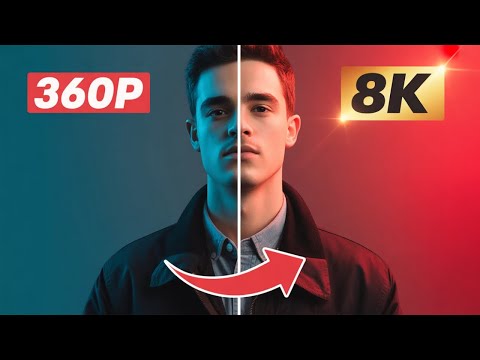
- Ultra-high-definition upscaling: Upscales digital graphics and photographs up to 8K print-ready resolution without pixelation.
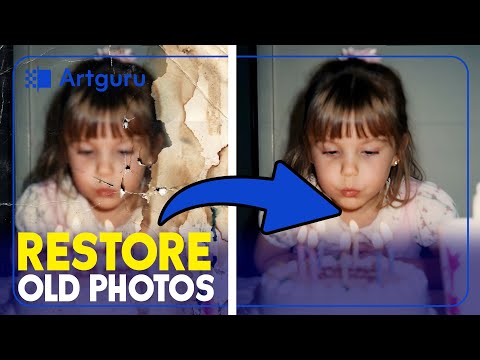
- Vintage photo restoration: Eliminates scratches, creases, and water spots from scanned heritage photographs while restoring faded colors.
- Temporal video enhancement: Sharpens video frames, reduces low-light noise, and upgrades standard definition clips to HD and 4K video streams.
- Automated background removal: Separates foreground subjects from complex backgrounds, generating transparent PNG assets in seconds.
- Document and PDF clarity booster: Enhances scanned contracts, receipts, and multi-page PDFs by increasing line contrast and boosting document DPI.
Competitor comparison
Practical use cases and target audiences
- E-commerce sellers and digital merchants: Upscales low-resolution supplier product photos, removes cluttered backgrounds, and produces crisp catalog images.
- Family historians and archivists: Restores damaged ancestral portraits, repairs physical tears and creases, and colorizes monochrome family records.
- Content creators and video editors: Enhances compressed archival video clips and sharpens YouTube thumbnail graphics for crisp high-definition displays.
- Print designers and illustrators: Enlarges mid-resolution digital artwork and AI-generated concepts to 300 DPI 8K formats suitable for physical print products.
Hardware, quota and file limitations
ArtGuru AI executes all processing tasks on remote cloud server clusters, eliminating the requirement for dedicated high-end GPU workstations. Users access the suite through any modern browser on desktop or mobile operating systems. The platform tracks consumption via shared account credits. Standard 4K photo enhancement costs 1 credit per image, 8K upscaling requires 10 to 20 credits depending on detail mode, and video enhancement uses 10 to 40 credits per second of footage. Paid subscribers receive 365-day media cloud storage, while free trial accounts retain files for 24 hours.
Pricing breakdown
*Pricing and plan details verified as of October 2026.
Implementation and onboarding pipeline
- Choose your enhancement tool: Navigate to the web workspace and select from Photo Enhancer, 8K Upscaler, Old Photo Restorer, or Video Enhancer.
- Upload media assets: Drag and drop your target JPG, PNG, WebP, or video file into the browser processing canvas.
- Configure restoration settings: Pick output resolution (4K or 8K), adjust enhancement intensity, and activate face restoration or colorization toggles.
- Compare and export: Inspect the before-and-after view using the interactive comparison slider, then download the full-resolution file without watermarks.
Structured editorial verdict
Best for: E-commerce merchants, digital creators, archivists, and everyday photographers who need clean 4K and 8K upscaling without buying expensive local software.
Not recommended for: High-end commercial retouchers who require granular manual layer adjustments, custom curve grading, and RAW sensor color profiling.
Learning curve: Very low. The system runs fully automated pipelines with simple presets and immediate visual previews.
Value threshold and ROI: Exceptional ROI at $4.99 monthly, saving hours of manual Photoshop retouching and scratch cleanup.
Bottom line: ArtGuru AI provides a dependable, accessible cloud enhancement suite that sharpens blurry photos, restores vintage scans, and upscales images up to 8K resolution in seconds.
F.A.Q
Pros and Cons
Pros
- Restores blurry faces and low-resolution photos with one-click neural enhancement
- Upscales digital graphics and photographs up to 8K print-ready resolution
- Repairs vintage damaged photographs by removing physical scratches, tears, and fold marks
- Enhances video clips with frame de-noising and resolution upscaling to HD and 4K
- Offers cross-platform access across web browsers, iOS, and Android applications
Cons
- Free tier outputs carry watermarks and enforce a 24-hour file retention limit
- Video enhancement consumes significant credit allotments per second of processed footage
- Advanced manual color grading and RAW image profile editing are not supported
- Unused subscription credits expire at the end of each billing cycle without rollover
Reviews
There are no reviews yet. Be the first one to write one.


Alternative tools

Let's Enhance AI is an automated image upscaling platform that enhances photos up to 16x (500MP) with RAW noise reduction, sharpening, and e-commerce presets.
2026-08-22
Freemium / $9-$24/mo

FaceRating.me is a browser-based AI facial analysis tool that maps 478 landmarks directly on your device to calculate objective symmetry, proportion ratios, and a 0 to 100 face score.
2026-10-12
Free / $17.49

AI photo and video creative studio for Indian creators and global users, with cinematic templates, fashion edits, festive greetings, couple photography, and photo-to-video concepts.
2026-11-04
Freemium / $9.00

HeadshotPro is an AI headshot generator that creates professional corporate portraits, LinkedIn photos, and team directories from casual selfies in under 2 hours.
2026-08-22
From $29 (One-time)

Topaz AI is a professional creative suite by Topaz Labs for AI photo and video enhancement, delivering 8K upscaling, RAW noise reduction, and face recovery.
2026-08-22
Subscription / $25-$45/mo

Lensa AI is a photo editing and portrait retouching app by Prisma Labs featuring Magic Avatars, skin smoothing, background blur, and AI art transformation.
2026-08-22
Freemium / $29.99/yr (or $2.99+ Packs)