

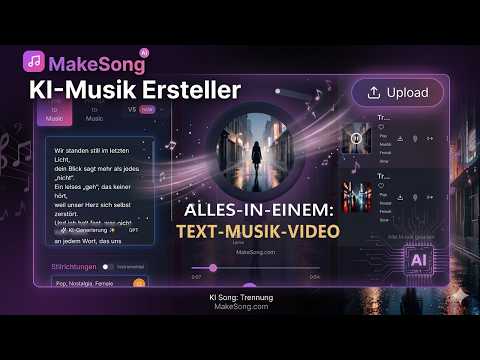
MakeSong AI is a browser-based generative audio workstation that creates full vocal tracks, instrumentals, custom lyrics, and synced AI music videos from plain text prompts.
Starting price Freemium / $7.90/mo

Tool Information
Overview and architecture
MakeSong AI is a browser-based generative music production platform designed to convert text prompts, thematic descriptions, and custom lyrics into complete songs. Built around deep acoustic synthesis and transformer models, the system handles melody composition, harmonic arrangement, vocal synthesis, and audio mastering within a single automated pipeline. Users specify stylistic parameters such as genre, mood, tempo, and vocal timbre, and the neural engine renders original audio tracks in seconds.
The platform architecture links natural language processing with neural audio decoders. When an operator submits a text query or a full set of lyrics, an integrated language model parses song structure into verses, bridges, and choruses. The acoustic modeling layer then predicts pitch contours, rhythmic timing, and vocal formants to produce vocal performances matched to instrumental arrangements. In addition to core audio synthesis, MakeSong AI integrates multimodal visual pipelines that generate synchronized lyric videos, animated singing avatars, and music clips directly within the web workspace.
Key capabilities and tools
- Text-to-song generation: Synthesizes complete songs with verses, choruses, and realistic vocal tracks from simple descriptions or thematic prompts.
- Custom lyric generation: Formats thematic ideas into structured rhyming lyrics with stanza tags up to 5,000 characters.
- Instrumental and backing track mode: Isolates melodic arrangements and rhythm sections without synthetic vocal overlays for background score production.
- Multi-genre styling: Covers a broad spectrum of musical directions including pop, rock, hip-hop, rap, country, electronic, jazz, and classical orchestrations.
- Automated AI video synthesis: Generates synchronized singing visuals, dance animations, and animated lyric clips aligned with generated audio beats.
- Direct audio export: Delivers finished audio outputs in downloadable MP3 and WAV formats for integration into video editors and streaming workflows.
Competitor comparison
Practical use cases and target audiences
- Digital content creators: YouTube and TikTok video producers can generate royalty-free background tracks and custom intro themes without copyright strikes.
- Independent game developers: Studio teams can quickly mock up ambient loops, battle themes, and character cues for prototyping game audio.
- Podcast and broadcast producers: Audio engineers can generate unique jingles, transitions, and bumper music matched to specific episode topics.
- Marketing and advertising teams: Brand managers can draft quick promotional audio jingles and product announcements for commercial campaigns.
- Songwriters and lyricists: Musicians can test lyrical pacing, vocal melodies, and chord progressions before booking studio recording sessions.
Hardware, quota and file limitations
MakeSong AI operates entirely via cloud infrastructure, requiring no local GPU hardware or digital audio workstation software. Access is available through any modern desktop or mobile browser. Input text submissions are capped at 5,000 characters for lyrics and 1,000 characters for stylistic descriptions. Audio generations consume platform credits based on track length and model version, with standard song creation requiring 3 credits per generation. Exported audio is formatted in MP3 and WAV containers. The platform requires an active high-speed internet connection to stream synthesized audio and download rendered video assets.
Pricing breakdown
*Pricing and plan details verified as of October 2026.
Implementation and onboarding pipeline
- Select production mode: Navigate to the web workspace and choose between Lyric to Music or Prompt to Music depending on whether you provide pre-written text.
- Configure musical parameters: Input your song lyrics or prompt description, set preferred genres, specify vocal style (male, female, or instrumental), and adjust duration.
- Generate and preview: Click the generate button to run the neural synthesis engine, producing full audio tracks in under a minute for interactive auditioning.
- Export and animate: Download high-fidelity WAV or MP3 files, or launch the integrated video generator to produce synced lyric clips for direct social distribution.
Structured editorial verdict
Best for: Social media creators, podcasters, indie game developers, and marketing specialists who need royalty-free music and custom video visuals on demand.
Not recommended for: Professional audio engineers and recording studio producers who require detailed multi-track DAW stem manipulation, MIDI exports, and micro-tuning controls.
Learning curve: Low. The web dashboard provides straightforward input boxes with sensible defaults, allowing new users to generate songs within five minutes.
Value threshold and ROI: High value for solo content creators and digital marketing agencies producing regular video content, where hiring session vocalists or licensing commercial music would cost significantly more.
Bottom line: MakeSong AI is an accessible generative audio platform that combines full song generation with automated visual tools, making music creation practical for creators without formal musical training.
F.A.Q
Pros and Cons
Pros
- Generates complete vocal songs across pop, rock, rap, and classical genres in under a minute
- Integrated AI lyric writer drafts structured verses and choruses based on thematic prompts
- Built-in video generator automatically synchronizes animated singing visuals and lyrics
- Commercial usage license included across all paid monthly and annual plans
- Flexible stem and instrumental toggle isolates backing tracks without vocal layers
Cons
- Free tier offers minimal starter credits before requiring paid subscriptions
- Limited manual sound engineering controls for multi-track mixing and micro-pitch adjustments
- Audio export resolution is restricted to standard MP3 and WAV quality formats
- High volume generation requires top-tier Premium subscriptions
Reviews
There are no reviews yet. Be the first one to write one.



Alternative tools

Turn one or two portrait photos into vertical 9:16 rap performance videos directly in your browser with custom stages, automated rhyming lyrics, and lip-sync generation.
2026-10-29
Paid / $6.99

Songtell is an AI music analysis platform that uncovers the hidden meanings, emotional arcs, and thematic subtexts behind song lyrics.
2026-10-07
Free / $0.00

Tuner Ninja is a free browser-based chromatic instrument tuner featuring real-time pitch detection, live audio waveforms, and reference tones for guitars and acoustic instruments.
2026-10-01
Free

Audio inpainting and music extension web application that lengthens uploaded audio tracks using generative diffusion and text prompts.
2026-10-04
Freemium / $19.93/mo

Mubert AI is a generative music platform that produces royalty-free background music, electronic beats, and real-time streaming soundtracks from text prompts.
2026-08-22
Freemium / $14.00-$199.00/mo

Boomy is an AI music creation platform that generates original songs in seconds, allowing creators to edit tracks and distribute music directly to streaming apps.
2026-08-22
Freemium / $9.99-$29.99/mo