

AI workflow automation platform that extracts data from documents, transforms complex tables, and automates operational processes without code.
Starting price Free / Custom

Tool Information
Overview and architecture
Parabola is an AI-powered visual workflow automation platform engineered specifically for operations, logistics, supply chain, retail, and finance teams. In many organizations, mission-critical operations remain trapped in manual spreadsheet maintenance, fragmented PDF invoices, disparate CSV exports, and repetitive data entry between disconnected software tools. Traditional event-based automation tools handle simple single-record notifications effectively, but they struggle when tasked with processing multi-row tables, complex inventory reconciliations, or variable-format document batches.
Parabola resolves these operational bottlenecks through its core workflow engine, Prowork. The platform combines visual pipeline construction with autonomous AI data extraction across four foundational architectural layers:
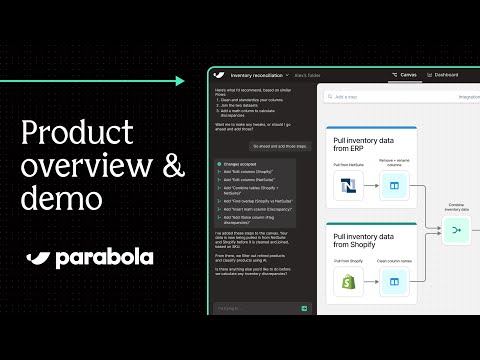
- Visual data canvas: Provides a drag-and-drop workflow environment where users connect data sources, transformation rules, and export destinations. Crucially, every individual step displays live tabular preview data, allowing operators to inspect intermediate calculations, spot anomalies, and verify output logic without relying on opaque black-box AI processing.
- Autonomous document extraction agents: Ingests unstructured and semi-structured documents including supplier invoices, shipping manifests, packing slips, and email attachments. The AI steps extract line items, prices, order numbers, and dates directly into structured tabular records without requiring custom template configuration.
- Multi-source integration hub: Connects directly to enterprise operational tools, cloud databases, and e-commerce platforms such as Shopify, Amazon Seller Central, Salesforce, HubSpot, Snowflake, Google Sheets, Airtable, and custom REST APIs.
- Automated execution and scheduling engine: Executes data flows on predefined schedules (such as hourly or daily cycles) or in response to real-time webhook events, delivering transformed records directly into enterprise resource planning (ERP) and warehouse management systems.
Key capabilities and technical specifications
Parabola offers deep data transformation functionality tailored to complex enterprise operations:
- Transparent intermediate data auditing: Users can click into any transformation step on the canvas to inspect row counts, schema changes, and exact cell values before data moves to subsequent steps.
- Multi-page document parsing: Processes dense PDF files, scanned documents, and spreadsheets, automatically classifying line-item tables and standardizing mismatched vendor layouts.
- Robust tabular transformation tools: Features a comprehensive library of visual steps to merge, join, filter, pivot, group, deduplicate, and calculate data across disparate sources.
- Embedded generative AI steps: Incorporates natural language prompts directly within workflows to summarize customer feedback, categorize inventory SKUs, and standardize unstructured addresses.
- Automated discrepancy alerting: Identifies variance between purchase orders, warehouse receiving logs, and vendor invoices, automatically flagging exceptions for human review.
- Enterprise governance and audit trails: Supports SOC 2 Type II compliance, encrypted credential storage, role-based access management, single sign-on (SSO), and complete workflow version histories.
Competitor comparison
The following table illustrates how Parabola compares against Make (Integromat) and Alteryx in managing operational data workflows:
| Dimension | Parabola | Make | Alteryx |
|---|---|---|---|
| Data Architecture | Engineered specifically for bulk tabular datasets, messy CSVs, and multi-row documents | Optimized for single-event triggers and linear record-by-record API routing | Heavy desktop and server data analytics suite for data science teams |
| Document AI Extraction | Native AI steps extract complex tables and line items directly into structured rows | Requires external OCR services or custom OpenAI modules for text extraction | Add-on intelligence suites requiring specialized data engineering setup |
| Logic Transparency | Live table view and calculation preview visible at every individual node | Execution history logs with JSON bundles requiring manual inspection | Complex visual node configuration requiring technical software proficiency |
| Target User Profile | Operations managers, logistics leads, supply chain analysts, finance teams | Digital marketers, web developers, general automation builders | Data engineers, quantitative analysts, enterprise BI specialists |
Practical use cases and target audiences
Parabola drives efficiency across numerous data-intensive operational domains:
- Supply chain and logistics reconciliation: Automatically compare supplier shipping manifests against warehouse receiving reports, detect quantity discrepancies, and update central ERP inventory counts.
- E-commerce inventory and catalog synchronization: Consolidate product listings, stock levels, and order histories across Shopify, Amazon, and third-party logistics (3PL) portals.
- Accounts payable invoice processing: Ingest supplier invoices from email inboxes, extract line-item totals and tax entries, validate charges against approved purchase orders, and push clean records to accounting software.
- Automated daily management reporting: Aggregate marketing performance, inventory turnover, and gross margin metrics into scheduled executive summaries delivered directly via Slack or email.
Hardware, quota and file limitations
Operational constraints and platform capacity considerations include:
- Credit-based usage allocation: Flow executions and AI extraction tasks consume credits based on processing volume. Free plans include an initial allotment of 1,000 monthly credits, while commercial tiers offer customized credit quotas.
- Supported document formats: File ingestion supports PDF, CSV, XLSX, TSV, JSON, and standard image formats for OCR parsing.
- Browser-based cloud environment: Operates entirely within standard web browsers (Google Chrome, Mozilla Firefox, Microsoft Edge, Safari) without requiring local client installations.
- API connectivity limits: Throughput depends on the rate limits and API access rules enforced by connected third-party platforms.
- Dataset processing thresholds: Large datasets process asynchronously in the cloud, with execution time scaled to table row counts and the complexity of transformation steps.
Pricing breakdown
Parabola provides self-serve access for individual operators alongside collaborative plans for enterprise teams:
| Plan Tier | Price | Included Features | Target Audience |
|---|---|---|---|
| Basic (Free) | $0 / month | 1,000 monthly credits, single user, full access to visual flow builder, standard integrations | Individual operators evaluating automated data flows |
| Solo / Pro | Self-serve tiered pricing | Higher monthly credit bundles, advanced scheduling intervals, priority execution queue | Independent business operators and dedicated analysts |
| Business | Custom commercial quote | Unlimited team users, customized credit pools, Applied AI engineering support, enterprise integrations | Growing retail, logistics, and supply chain departments |
| Enterprise | Custom annual agreement | Dedicated account management, enterprise SSO/SAML, custom SLA guarantees, advanced security reviews | Large enterprises requiring comprehensive compliance controls |
*Pricing and plan details verified as of October 2026.
Implementation and onboarding pipeline
Deploying automated data workflows in Parabola follows four systematic stages:
- Data source connection: Connect incoming data streams by linking cloud databases, e-commerce stores, cloud storage folders, or uploading initial sample CSV and PDF files.
- Visual flow construction: Drag and drop transformation cards onto the canvas to filter, merge, calculate, and parse data, checking intermediate output tables after each action.
- Validation and exception testing: Run test executions on live data batches to confirm calculations match operational business rules and verify AI extraction accuracy.
- Scheduling and destination sync: Set automated recurrence schedules or webhook triggers, directing verified clean data into downstream ERPs, databases, or notification channels.
Editorial verdict
- Best for: Operations managers, supply chain specialists, e-commerce leads, and business analysts seeking to eliminate manual spreadsheet work and complex document entry without hiring software engineers.
- Not recommended for: Simple one-step notification automations (such as basic email alerts where lightweight webhook tools suffice) or engineering teams that require pure code-based script orchestration.
- Learning curve: Low to moderate. Anyone with comfortable spreadsheet skills (such as pivot tables and VLOOKUP) can build functional workflows within a few hours.
- Value threshold and ROI: Saves operational teams between 100 and 150 hours per month on repetitive data entry, delivering immediate positive return on investment within the first live deployment.
- Bottom line: Parabola provides an indispensable, transparent AI data workspace that empowers non-technical operations teams to automate complex data workflows with complete confidence.
F.A.Q
Pros and Cons
Pros
- Visual canvas with live table preview at every node for complete logic transparency
- Autonomous AI document extraction parses complex multi-line PDF invoices and receipts
- Extensive data transformation library handles merging, grouping, filtering, and pivoting
- Native integrations for Shopify, Salesforce, Snowflake, Google Sheets, and REST APIs
- Replaces manual spreadsheet manipulation and reduces operational overhead by over 100 hours monthly
Cons
- Free tier provides 1,000 monthly credits which limits high-volume document batch runs
- More complex to configure than simple one-trigger webhook tools like basic Zapier tasks
- Custom enterprise deployments require sales coordination for dedicated Applied AI team support
Reviews
There are no reviews yet. Be the first one to write one.



Alternative tools

Automation Anywhere is an enterprise AI automation platform combining autonomous generative AI agents, RPA bots, and document processing into unified workflows.
2026-08-22
Enterprise License (Custom Quote)

n8n is an open-source workflow automation platform featuring AI agent nodes, ReAct reasoning, and self-hosted privacy for building custom multi-app pipelines.
2026-08-22
Free / Open Source (Self-Hosted) / $20+/mo Cloud

Make is a visual no-code workflow automation platform connecting 1,500+ apps with interactive drag-and-drop scenarios, webhooks, and multi-step AI agents.
2026-08-22
Freemium / $10.59-$34.12/mo

Zapier Agents is an AI automation platform that lets teams build autonomous assistants to execute multi-step workflows, research data, and act across 6,000+ apps.
2026-08-22
Freemium / $50/mo Pro

Durable AI is an AI website generator for small businesses that creates custom websites in 30 seconds with built-in CRM, automated invoicing, and Google SEO.
2026-08-22
Freemium / $12-$20/mo

Workato AI is an enterprise iPaaS and agentic automation platform connecting 1,000+ business applications using low-code recipes and AI workflow agents.
2026-08-22
Enterprise License (Custom Annual)