

Browser extension and web workspace to search, organize, and export Twitter/X likes and bookmarks into a searchable knowledge library.
Starting price Freemium / $8.90/mo

Tool Information
Overview and architecture
Twibird is a specialized personal knowledge management utility designed to resolve the limitations of Twitter/X native bookmarking. Millions of users save tweets, research threads, code snippets, and industry analyses on Twitter, yet the official interface provides only a linear, infinite-scroll list without full-text search, folders, or bulk export options. Twibird addresses this operational gap by converting unstructured saved posts into an organized, instantly searchable digital archive.
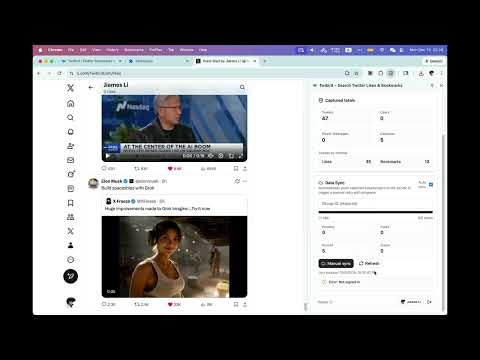
The technical architecture of Twibird relies on a dual-engine model combining a client-side Chrome extension with a secure web dashboard. The Chrome extension functions as an ingestion agent, extracting bookmarked items, likes, author metadata, and attached media directly from the active browser session. To prioritize data privacy, the extension maintains a local SQLite or IndexedDB storage layer, enabling instant offline search without transmitting raw browsing logs to central servers. When cloud backup is enabled, data synchronizes with Twibird cloud infrastructure to preserve content against tweet deletion and support team workspace collaboration.
Unlike automated social bots, Twibird operates with read-only permissions and never posts content or alters account credentials. Users maintain full sovereignty over their library, with options to download entire archives as portable CSV datasets or sync structured records directly into external productivity environments like Notion.
Key capabilities and workflow modules
Twibird structures Twitter content curation into several core functional components:
- Instant full-text search: An indexed search bar queries tweet text, author handles, attached media descriptions, and user notes with sub-second retrieval times.
- Multi-level folders and smart tags: Users categorize saved tweets by topic, project, or client using hierarchical folders and multi-tag classification schemes.
- Local-first offline mode: The Chrome extension caches your library locally, allowing full search and reading functionality without an active web connection.
- Notion and CSV export pipeline: Bookmarks and likes export cleanly into Notion databases or structured CSV files, complete with author links, engagement counts, and media URLs.
- Cloud tweet preservation: Paid tiers preserve archived tweet content in secure storage, protecting valuable research notes if an author deletes the original post or sets their profile to private.
- Saved search filters and reminders: Operators create persistent multi-parameter filter presets and schedule resurfacing reminders to review reference material for upcoming projects.
Competitor comparison table
The following table illustrates how Twibird compares with Twitter/X native bookmarks and multi-platform read-later utilities:
Practical use cases and target audiences
Twibird targets knowledge workers and content specialists who depend on social media intelligence:
- Market researchers and analysts: Professionals tracking emerging tech developments, competitive moves, and industry data points who need a searchable repository of primary social signals.
- Writers, bloggers and journalists: Authors collecting quotes, sources, and story angles who require tagging by topic and structured export into writing environments.
- Software engineers and founders: Builders collecting code snippets, architectural discussions, and product launch examples for future implementation reference.
- Content marketers and growth teams: Marketers compiling swipe files of high-performing hooks, ad creatives, and viral formats to inform editorial planning.
Hardware, quota and file limitations
Operating Twibird involves specific platform capabilities and usage limits defined by account tier:
- Item synchronization quotas: The free Starter plan caps library size at 1,000 total likes and bookmarks. The Standard tier expands capacity to 10,000 items, while Team plans support up to 1,000,000 entries.
- Browser dependency: The local-first offline indexing module operates through the Chromium extension environment, requiring Google Chrome, Brave, Edge, or compatible browsers.
- Sync frequency: Free users initiate sync runs manually. Standard and Team accounts utilize automatic daily background synchronization.
- Filter configurations: The free plan restricts saved search filter rules to 5 configurations, while paid tiers grant unlimited saved queries.
- Export formats: Standard accounts include direct Notion and CSV exports. Custom programmatic API access is reserved exclusively for the Team tier.
Pricing breakdown table
Twibird offers a tiered pricing model with a generous free plan, monthly or discounted annual subscriptions, and an optional on-demand sync purchase.
*Pricing and plan details verified as of October 2026.
Implementation and onboarding pipeline
Setting up your personal Twitter knowledge base with Twibird follows four steps:
- Extension installation: Install the official Twibird Chrome extension from the Chrome Web Store and sign in via Twitter/X authorization.
- Initial bookmark ingestion: Trigger the initial import process through the extension popup to index your existing library of likes and bookmarks into local storage.
- Taxonomy configuration: Create relevant folders (such as AI Tools, Market Data, or Copywriting Hooks) and assign tags to organize entries into clear thematic groups.
- Export and sync integration: Connect your Notion account or set up scheduled CSV downloads to route curated social knowledge into your primary working notes.
Our Verdict
- Best for: Researchers, writers, marketers, and developers who actively save high-signal threads on Twitter/X and need a fast, local-first search engine with folder tagging and Notion exports.
- Not recommended for: Casual social users with fewer than 50 total saved posts or teams seeking automated outbound social publishing and scheduling tools.
- Learning curve: Minimal. The interface mirrors standard bookmark managers, and full-text search functions immediately upon completing the first extension sync.
- Value threshold and ROI: High. The free tier comfortably satisfies personal research needs up to 1,000 items. For power users, the $8.90 monthly plan eliminates the frustration of lost bookmarks and protects reference material against tweet deletions.
- Bottom line: Twibird transforms the disorganized mess of Twitter bookmarks into an actionable, permanent knowledge base with impressive local search speed and solid export tools.
F.A.Q
Pros and Cons
Pros
- Fast full-text search across tweet bodies, media captions, and notes
- Local-first Chrome extension keeps bookmark index accessible offline
- Multi-level folder hierarchy with smart tags and saved filters
- Direct export to CSV and Notion databases for knowledge management
- Generous free plan supporting up to 1,000 saved items
- Preserves tweet context even if posts are later deleted on Twitter
Cons
- Full auto-sync and API exports require paid or team tiers
- Deep features require installing the desktop Chrome extension
- Free plan limits saved custom search filters to 5 rules
- Team collaboration tier carries a steep monthly commitment
Reviews
There are no reviews yet. Be the first one to write one.


Alternative tools

AdCreative.ai is a generative marketing platform that produces conversion-optimized ad banners, social creatives, and copy scored by machine learning models.
2026-08-22
Freemium / $39-$249/mo

Ocoya is an AI social media management tool combining AI copywriting, graphic design templates, multi-channel post scheduling, and e-commerce product sync.
2026-08-22
Free Trial / $15-$79/mo

Leofame is an automated social media growth platform offering followers, likes, comments, and views across Instagram, TikTok, and YouTube.
2026-09-28
Freemium / $2.76 one-time

Zoho Social is an all-in-one social media management and scheduling platform with Zia AI that streamlines multi-channel publishing, monitoring, and analytics.
2026-09-02
Free / $10.00/mo

Flick Social is a social media management platform that combines AI copywriting, visual calendar scheduling, hashtag analytics, and growth metrics across major networks.
2026-08-22
From £11.00/mo (Paid)

Vmake Labs is an AI social video and e-commerce studio that turns product photos into viral UGC ads, shoppable videos, and high-resolution assets.
2026-08-28
Free / $12.99/mo