

Fast, private voice dictation for Mac and Windows. Hold a key, speak, and Yap types your words into any app. Speech recognition runs on your computer, so audio is never uploaded.
Starting price Trial / $6.90/mo
Tool Information
Overview and architecture
Yap is a native on-device voice dictation application built for macOS and Windows desktops, with mobile companion coverage on iOS and Android. The software allows users to speak naturally into their microphone and instantly receive formatted text at their blinking cursor across any active application. Speech recognition runs locally on the user machine, which means raw audio recordings never travel across external networks or rest on third-party servers.
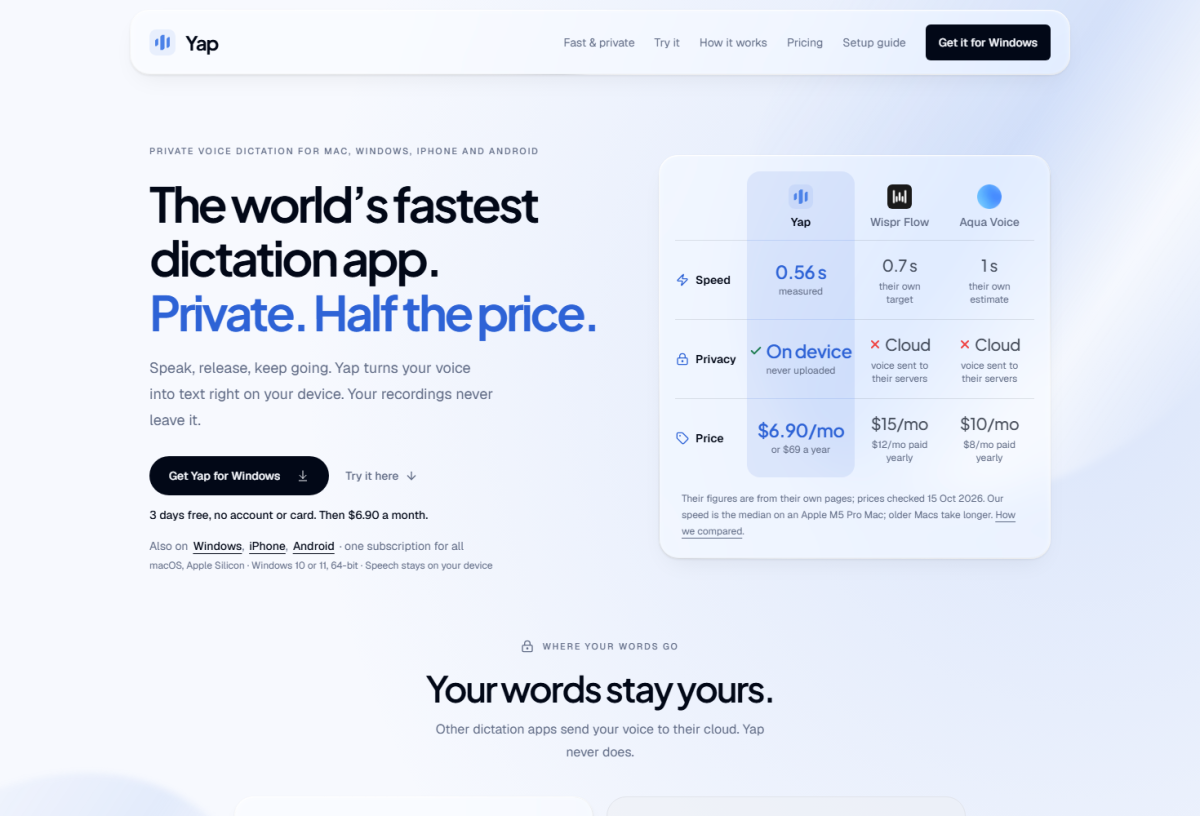
Under the hood, Yap relies on optimized, quantized neural speech recognition models executed through local hardware acceleration frameworks. On Apple Silicon systems (M1 through M5 series), the software leverages the Apple Neural Engine and unified memory architecture to process audio spectrograms with minimal latency. On Windows, Yap utilizes direct compute runtimes to run acoustic decoding across available processor cores and graphics hardware. The architecture measures a median response latency of 0.56 seconds on Apple Silicon hardware, delivering words to the screen almost immediately upon hotkey release.
The system operates through an operating system level injection layer. When the user holds down the assigned global shortcut (defaulting to the Fn key), Yap captures audio into an isolated volatile memory buffer. As soon as the user releases the key, the local neural model finalizes the transcript, runs local punctuation normalization, and places the resulting string directly into the active window via accessibility and input simulation APIs. Because no network requests occur during transcription, the application functions seamlessly in offline environments, high-security corporate perimeters, and transit zones without internet connectivity.
Key capabilities and workflow modules
- Global push to talk activation: Users initiate dictation by holding down a physical key (Fn by default) and speaking. Releasing the key triggers instant transcription and pastes the text directly at the active cursor position.
- Universal desktop application support: Works system-wide across any application that accepts text input, including IDEs, code editors, command-line terminals, web browsers, document suites, and team chat clients.
- Automatic multilingual recognition: Detects and transcribes 25 global languages on the fly without requiring the user to switch input profiles manually between sentences.
- Spoken punctuation and formatting commands: Translates spoken commands such as “new line”, “new paragraph”, “comma”, and “question mark” into accurate typography when the setting is enabled.
- Searchable local transcript history: Maintains a private, on-device catalog of prior voice dictation sessions, enabling users to retrieve previously spoken thoughts and verify past notes.
- Cross-platform license coverage: A single active user subscription unlocks full functionality across macOS, Windows, iPhone, and Android clients without requiring separate seat purchases.
- Zero server audio storage: Eliminates third-party data collection risks by isolating speech processing entirely to local hardware memory.
Competitor comparison table
To evaluate how Yap compares to conventional cloud-based voice dictation platforms, the table below highlights architectural differences, latency benchmarks, data privacy boundaries, and pricing structures against Wispr Flow and Aqua Voice.
Practical use cases and target audiences
Yap serves technical professionals, privacy conscious operators, and heavy typists who require low latency voice entry without compromising confidential business assets.
- Software engineers and technical writers: Developers dictating commit messages, code comments, pull request summaries, and terminal commands directly into VS Code, JetBrains IDEs, and CLI tools like Claude Code without leaving the keyboard flow.
- Legal, healthcare, and compliance specialists: Attorneys, doctors, and auditors working under strict data privacy regulations (such as HIPAA, GDPR, or internal NDA standards) where sending voice recordings to third-party cloud servers is strictly restricted.
- Long-form authors and essayists: Writers drafting books, research papers, and blog posts at conversational speech velocity (150 words per minute or more) directly into document processors like Notion, Google Docs, or Obsidian.
- Multilingual knowledge workers: Professionals communicating with international colleagues who frequently alternate between English and regional languages during daily correspondence.
Hardware, quota and file limitations
Because Yap relies on local neural networks rather than remote server clusters, users should account for specific system requirements and operational constraints:
- Operating system compatibility: Requires macOS 13 (Ventura) or newer running on Apple Silicon processors (M1, M2, M3, M4, M5). Intel-based Macs are not supported due to the hardware requirements of the local speech model. Windows requires Windows 10 or Windows 11 (64-bit x86 or Arm64 architectures).
- Initial model caching: Although subsequent dictation runs entirely offline, the initial application setup requires an internet connection to download and cache the neural speech recognition weights.
- System memory usage: The local model occupies between 500 MB and 1 GB of RAM during active execution, alongside approximately 1 GB of local disk storage.
- Real-time dictation focus: Yap is designed specifically for real-time cursor input. It does not function as an asynchronous audio batch transcriber for pre-recorded podcast files or meeting recordings.
- Accessibility permissions: The application requires operating system accessibility and microphone permissions to register global keystrokes and insert generated text into background windows.
Pricing breakdown table
Yap offers a straightforward pricing structure with a card-free evaluation period followed by flexible monthly or discounted annual subscription tiers.
*Pricing and plan details verified as of October 2026.
Implementation and onboarding pipeline
Setting up Yap on desktop workstations involves four sequential steps:
- Download the desktop installer: Download the official installation binary from the provider portal (DMG file for macOS or standard setup executable for Windows).
- Authorize system permissions: Launch the application and grant the necessary operating system permissions for microphone capture and accessibility input monitoring.
- Cache the local neural model: Allow the application to perform its one-time background download of the speech recognition model weights to local storage.
- Dictate into your workspace: Place the cursor into any target text field, hold down the Fn shortcut key, speak naturally, and release the key to paste the transcribed text instantly.
Structured editorial verdict
- Best for: Engineers, writers, and confidentiality-minded operators who need fast voice dictation at their cursor without exposing sensitive audio to cloud networks.
- Not recommended for: Users on older Intel Macs, teams seeking multi-speaker conference meeting transcription bots, or creators requiring asynchronous batch media file processing.
- Learning curve: Low. The physical push to talk activation workflow requires zero adjustments to existing window arrangements or typing habits.
- Value threshold and ROI: At $6.90 per month across multiple devices with a 3-day card-free trial, Yap provides strong cost efficiency compared to cloud dictation services charging double or triple that rate.
- Bottom line: Yap delivers responsive, dependable on-device voice dictation with complete privacy isolation, making it an excellent utility for daily writing and programming tasks.
F.A.Q
Pros and Cons
Pros
- Dual-engine local speech recognition runs entirely on Apple Silicon and Windows hardware without cloud reliance
- Zero external audio uploads guarantees complete privacy for confidential legal, medical, and development workflows
- Push-to-talk activation inserts transcribed text directly into any focused application cursor at 0.56s median speed
- Supports 25 languages with automatic language detection without manual configuration toggling
- Single license covers desktop installations on macOS and Windows as well as mobile versions on iOS and Android
- Includes a 3-day full feature trial without requiring account registration or credit card entry
Cons
- Requires macOS 13 or newer on Apple Silicon hardware, leaving Intel-based Mac systems unsupported
- Operates strictly as a real-time cursor dictation tool and does not process pre-recorded audio or video files
- Initial setup requires an internet connection to download and cache the local speech model weights
Reviews
There are no reviews yet. Be the first one to write one.


Alternative tools

AI British accent text to speech platform featuring 315 UK voices across Received Pronunciation, Scottish, Welsh, and Northern Irish styles with voice cloning and lip sync.
2026-10-31
Freemium / $9.99/mo

Resemble AI is an enterprise generative voice platform offering realistic voice cloning, real-time speech-to-speech, emotion control, and deepfake detection.
2026-08-22
Pay-as-you-go / From $0.0005/sec

Audeus converts PDFs, Word documents, EPUB books, and web pages into realistic spoken audio with real-time text highlighting and speeds up to 3.5x.
2026-09-26
Freemium / $9.92/mo

Murf AI is an enterprise speech platform powered by Falcon and Gen2 models, generating natural voiceovers, voice cloning, and conversational agents in 20+ languages.
2026-08-22
Freemium / $19-$66/mo

Wispr Flow is an AI voice-to-text dictation app and meeting notetaker that transcribes speech into formatted text across 100+ languages directly at the cursor.
2026-09-25
Freemium / $12.00/mo

Speechify is an AI text-to-speech platform that converts articles, PDFs, and books into natural spoken audio at up to 5x listening speeds across 60+ languages.
2026-08-22
Freemium / $11.58-$29/mo